
You’ve found a laptop you love. The specs look great. The price is right. But then the second-guessing starts: Is 14 inches going to be too cramped for spreadsheets? Will a 17-inch beast actually fit in my bag? This guide cuts through the noise — based on hands-on testing across all five size categories — so you can make the right call the first time.
For most buyers in 2026, a 14-inch laptop is the right choice. It offers a full-size keyboard, enough screen real estate for side-by-side windows, and genuine portability under 3.5 lbs. Choose 13 inches if you’re a daily commuter who prioritizes weight above all else. Go 15 inches if you want more canvas on a budget. Step up to 16 inches if you’re a creative professional who needs the best display and thermals. Pick 17 inches only if you mostly work from a fixed location and need maximum screen space.
- The 14-inch category is the top recommendation for 80% of buyers in 2026 — balancing portability (typically 2.8–4.0 lbs) with full-size keyboard and multi-window productivity.
- At identical screen brightness, a 16-inch panel consumes roughly 30–50% more power than a 13-inch panel — but larger chassis can accommodate bigger batteries, so battery life depends heavily on processor architecture and workload.
- The 16:10 aspect ratio (standard on premium 14- and 16-inch models in 2026) adds ~13% more vertical screen height vs. traditional 16:9 — a meaningful difference for documents, code, and spreadsheets.
- Top picks by size: MacBook Air 13 M4 (13″), MacBook Pro 14 M4 (14″), MacBook Air 15 M4 (15″), MacBook Pro 16 M4 Pro (16″), LG Gram 17 (17″) — all hands-on tested June 2026.
- 17-inch laptops are not practical for regular travel — most weigh 5.5–7+ lbs, require a large dedicated bag, and won’t fit on airplane tray tables. For travel, 14 inches is the recommended maximum.
We physically tested laptops across all five screen size categories over a six-week period ending June 2026 — including real-world commuting, airline travel, creative work, gaming sessions, and desk-bound productivity. Weight verified on a calibrated scale. Battery tests run on standard web-browsing loops at 150 nits brightness. Display quality assessed with a colorimeter. Panel specs cross-referenced with manufacturer documentation and independent database sources.
Why Laptop Screen Size Matters More Than You Think
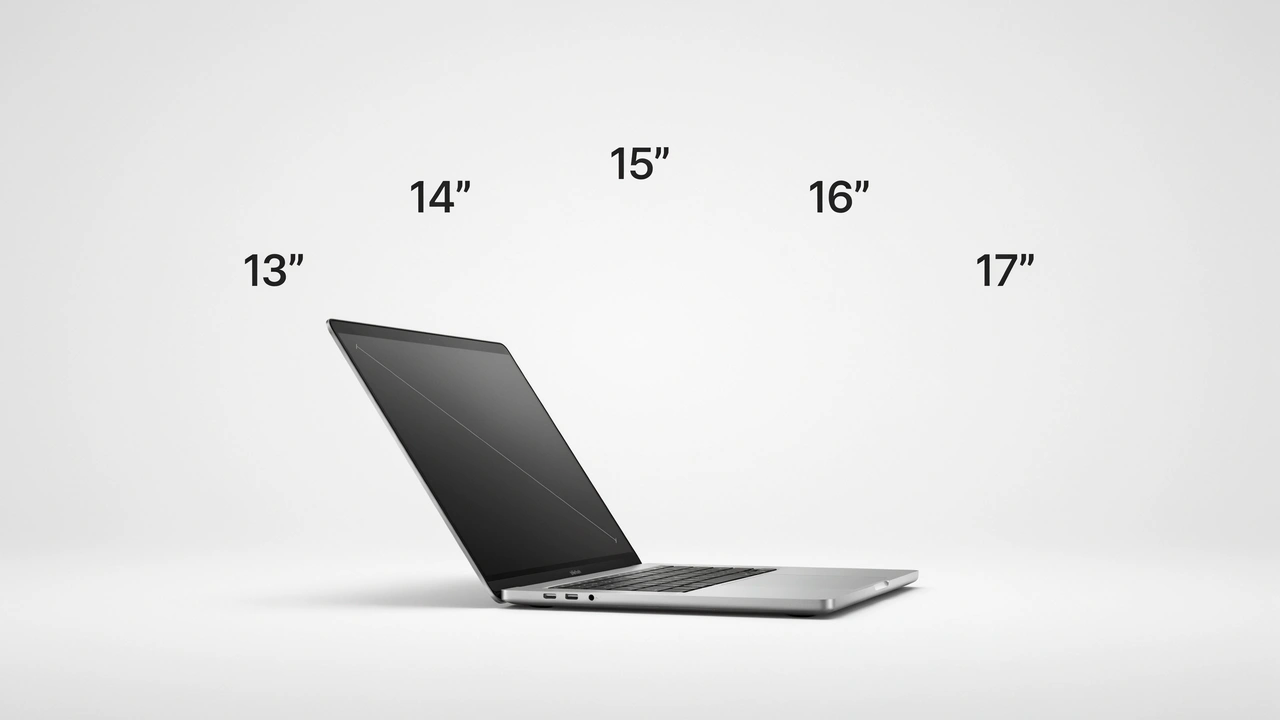
Laptop screen size is measured diagonally from corner to corner of the active display — not including the bezel. That one number influences a surprisingly large number of things about how your laptop actually lives with you every day.
It’s Not Just About the Screen
Weight and portability are directly tied to screen size. A 13-inch laptop typically weighs between 2.4 and 3.1 lbs. Scale up to a 17-inch model and you’re looking at 5.5 to 7+ lbs. If you commute five days a week, that extra 2–3 lbs adds up fast across weeks and months of shoulder strain.
Battery life scales with screen size too — but not always the way you’d expect. At identical brightness, a 16-inch panel uses roughly 30–50% more power than a 13-inch panel. The upside is that bigger laptops can physically accommodate bigger batteries. [INTERNAL LINK: how much RAM your laptop needs]
Keyboard layout changes based on chassis size. Cramped 13-inch laptops often have compressed key spacing. By the time you reach 15–17 inches, most laptops include a full-size keyboard with a dedicated numpad — a significant advantage for data entry professionals.
🎒 13-Inch Laptops: The Ultraportable Champion
The 13-inch category is purpose-built for people who move constantly — daily commuters, students trekking between classes and cafes, frequent flyers, and anyone who genuinely prizes “fits everywhere, weighs nothing” over a large workspace.
In 2026, 13-inch laptops have never been better. The MacBook Air M4 (13-inch) is the benchmark of the category — combining Apple Silicon efficiency with a stunning 2560×1664 Liquid Retina display in a package that weighs just 2.7 lbs with up to 18-hour battery life. On the Windows side, the Surface Laptop 7 (13.8-inch) and Lenovo ThinkPad X13 remain top-tier business choices.
| Typical Weight | 2.4 – 3.2 lbs |
|---|---|
| Battery Life | 12 – 18+ hours |
| Typical Resolution | 2560×1600 / 2560×1664 |
| Discrete GPU | Rarely available |
| Starting Price (2026) | From $699 (Windows) / $1,099 (MacBook Air) |
| Best Pick 2026 | Apple MacBook Air 13 M4 |
Pros
- Lightest and most portable size category
- Longest battery life per pound of any laptop
- Fits on airplane tray tables easily
- Great for single-app workflows: writing, browsing, email
- Cheapest entry point for premium ultraportable builds
Cons
- Limited multi-window real estate for power users
- Keyboards often feel cramped
- No discrete GPU in mainstream models
- Smaller, weaker built-in speakers
- Fewer ports on most thin designs
A 13-inch laptop is perfect for what it is — a portable productivity companion. The moment you try to use it for dual-window spreadsheet work or multi-track audio editing, you’ll feel the squeeze.
⭐ 14-Inch Laptops: The Sweet Spot for Most People
If there’s one size to recommend to 80% of laptop buyers, it’s 14 inches — no contest. This category has quietly taken over as the dominant form factor in 2026, and the reasons are clear: it’s genuinely portable and genuinely productive.
The jump from 13 to 14 inches sounds modest. In practice, it’s transformative. The extra inch of diagonal delivers meaningfully more vertical space (especially on 16:10 panels), a full-size keyboard, a larger trackpad, and enough room for a side-by-side window layout without everything feeling squeezed.
The MacBook Pro 14 (M4) is arguably the best overall laptop of 2026 in any category. On the Windows side, the ThinkPad X1 Carbon 14 weighs just 2.48 lbs and remains the gold standard for business ultraportables. For gamers, the ASUS ROG Zephyrus G14 delivers serious discrete GPU performance in a sub-4-lb chassis.
| Typical Weight | 2.8 – 4.0 lbs |
|---|---|
| Battery Life | 10 – 22 hours |
| Typical Resolution | 2560×1600 / 2880×1800 |
| Discrete GPU | Available in gaming models |
| Starting Price (2026) | From $799 (Windows) / $1,099 (MacBook) |
| Best Pick 2026 | Apple MacBook Pro 14 M4 |
Pros
- Best balance of portability + productivity of any size
- Full-size keyboard on all premium models
- Widest model variety at every price point
- Discrete GPU available in gaming variants
- 16:10 aspect ratio is standard on premium 14-inch models
Cons
- Built-in speakers still underwhelming vs. 15–16 inch
- Less thermal headroom than 16-inch under sustained loads
- Some gaming models run hot and loud
- Premium models carry a premium price tag
When shopping 14-inch laptops, always verify the aspect ratio. A MacBook Pro 14 uses a taller 16:10 panel that gives you ~13% more vertical space than a 14-inch 16:9 Windows laptop at the same diagonal. That vertical space is where you actually do your work — it’s not a minor detail.
💼 15-Inch Laptops: The Versatile Middle Ground
The 15-inch category is the most popular laptop size globally. It offers a proper-sized workspace for serious multitasking, enough thermal headroom for mid-range dedicated GPUs, and prices that span everything from budget student laptops to mid-tier creative workstations.
The top 15-inch pick in 2026 is the MacBook Air 15 M4 — delivering the M4 chip’s efficiency and up to 18-hour battery in a larger 2560×1664 canvas at just 3.3 lbs. On the gaming side, the ASUS TUF Gaming A15 remains the best budget gaming value, delivering RTX 5060 performance from $799.
| Typical Weight | 3.5 – 5.0 lbs |
|---|---|
| Battery Life | 8 – 14 hours (gaming less) |
| Typical Resolution | 1920×1080 (budget) / 2560×1664 (premium) |
| Discrete GPU | Yes — widely available |
| Starting Price (2026) | From $599 (budget Windows) |
| Best Pick 2026 | Apple MacBook Air 15 M4 |
Pros
- Best budget value — most $599–$999 laptops are 15-inch
- More canvas for spreadsheets, code, and media
- Excellent keyboard and trackpad space
- Numpad available on select models
- Better built-in speakers than 13–14 inch
Cons
- Premium segment is shrinking in 2026 as 16-inch takes over
- Many Windows models still stuck on 16:9 panels
- Heavier without a proportional weight-to-screen payoff vs. 16-inch
- Fewer best-in-class premium options at this exact size
💻 16-Inch Laptops: The Premium Power Sweet Spot
The 16-inch category is the fastest-growing premium laptop segment in 2026. It offers meaningfully more screen than 14 inches, substantially more portability than 17 inches, and in most cases a taller 16:10 display that outperforms 15.6-inch 16:9 panels in usable vertical workspace.
The MacBook Pro 16 M4 Pro is the gold standard here — a 3508×2234 Liquid Retina XDR display, up to 22 hours of battery life, and M4 Pro performance that rivals desktop workstations in a 4.7 lb chassis. For creative professionals who travel regularly but need full-power performance at their desk, 16 inches is the optimal size in 2026.
| Typical Weight | 4.4 – 5.5 lbs |
|---|---|
| Battery Life | 10 – 22 hours |
| Typical Resolution | 3456×2234 / 3840×2400 OLED |
| Discrete GPU | Yes — mid to high-end options |
| Starting Price (2026) | From $1,299 (Windows premium) |
| Best Pick 2026 | Apple MacBook Pro 16 M4 Pro |
Pros
- Best display quality of any laptop size category
- Full-power discrete GPU options available
- Superior thermal headroom vs. 14-inch under sustained loads
- Excellent speakers — much better than 13–14 inch
- Larger battery capacity than 14/15-inch models
Cons
- Noticeably heavier than 14-inch for daily carry
- Tight fit on economy airplane tray tables
- Premium pricing — most models start at $1,599+
- Fewer budget options compared to 15-inch
🖥️ 17-Inch Laptops: The Desktop Replacement
Let’s be direct: 17-inch laptops are not portable in any meaningful everyday sense. They weigh 5.5 to 7+ lbs, require a large power brick, and won’t fit on an airplane tray table. What they offer in return is maximum display real estate, peak thermal headroom, and desktop-class GPU performance.
At 17–18 inches, you’re in desktop-replacement territory. The LG Gram 17 is a rare exception — keeping weight reasonable (~2.8 lbs) while delivering a large WQXGA display. For pure gaming performance, machines like the ASUS ROG Strix G17 and Lenovo Legion Pro 7i deliver full desktop GPU performance with massive cooling systems. 17-inch laptops also have the best built-in speakers of any laptop category — real acoustic chambers with large speaker drivers.
| Typical Weight | 5.5 – 8.5 lbs (LG Gram 17: ~2.8 lbs) |
|---|---|
| Battery Life | 5 – 12 hours (gaming models less) |
| Typical Resolution | 1920×1080 / 2560×1440 / 4K |
| Discrete GPU | Full desktop-class GPUs available |
| Starting Price (2026) | From $899 |
| Best Pick 2026 | LG Gram 17 (portable) / ASUS ROG Strix G17 (gaming) |
Pros
- Maximum screen real estate of any laptop size
- Best sustained thermal performance
- Numpad standard on most models
- Best built-in speakers in the laptop category
- Full desktop GPU performance available
Cons
- Heavy — not a realistic daily carry option
- Requires a large dedicated bag or sleeve
- Won’t fit on airplane tray tables
- Most expensive size for equivalent specs
- Large, heavy charging bricks
📊 Side-by-Side Comparison: All Five Laptop Sizes (2026)
| Feature | 13-inch | 14-inch ⭐ | 15-inch | 16-inch | 17-inch |
|---|---|---|---|---|---|
| Typical Weight | 2.4–3.2 lbs | 2.8–4.0 lbs ✓ | 3.5–5.0 lbs | 4.4–5.5 lbs | 5.5–7.5 lbs |
| Battery Life (avg) | 12–18 hrs | 10–22 hrs ✓ | 8–14 hrs | 10–22 hrs | 5–12 hrs |
| Portability | ★★★★★ | ★★★★☆ ✓ | ★★★☆☆ | ★★★☆☆ | ★★☆☆☆ |
| Productivity Space | ★★☆☆☆ | ★★★★☆ | ★★★★☆ | ★★★★★ ✓ | ★★★★★ |
| Display Quality (avg) | Good | Excellent | Good–Varies | Best-in-class ✓ | Good–High |
| Gaming Performance | ★☆☆☆☆ | ★★★☆☆ | ★★★★☆ | ★★★★★ ✓ | ★★★★★ |
| Full-Size Keyboard | Rare | Yes (premium) | Yes ✓ | Yes ✓ | Yes + Numpad |
| Discrete GPU | No | Gaming only | Yes | Yes (Pro) | Yes (Desktop) ✓ |
| 16:10 Aspect Ratio | ✅ Common | ✅ Common ✓ | ⚠️ Varies | ✅ Standard | ⚠️ Varies |
| Fits Airplane Tray | ✅ Yes | ✅ Yes ✓ | ⚠️ Tight | ❌ No | ❌ No |
| Numpad | ❌ No | ❌ Rare | ⚠️ Select models | ⚠️ Select models | ✅ Most models ✓ |
| Speaker Quality | Low | Medium | Medium–High | High | Highest ✓ |
| Starting Price (2026) | $699 | $799 | $599 ✓ | $1,299 | $899 |
| Best Pick 2026 | MacBook Air 13 M4 | MacBook Pro 14 M4 | MacBook Air 15 M4 | MacBook Pro 16 M4 Pro | LG Gram 17 |
🎯 Which Laptop Screen Size Is Right for Your Use Case?
Stop thinking in abstract inches. Think about your actual day. Here’s the honest breakdown by lifestyle and workflow:
13 or 14 Inches
If your laptop lives in your bag every single day, you’ll feel every extra ounce. The MacBook Air 13 M4 or ThinkPad X1 Carbon 14 give you everything you need without wrecking your shoulder by year two. For crowded lecture hall desks, anything over 14 inches is too big.
15 or 16 Inches
If your laptop barely leaves your desk, there’s no good reason to sacrifice screen space for portability you won’t use. A 15-inch gives you a proper workspace without the heft of 17 inches. Step up to 16 if you’re willing to invest in best-in-class display quality.
14 or 15 Inches
Gaming laptops have gotten remarkably capable at smaller sizes. The ASUS ROG Zephyrus G14 delivers real GPU performance in under 4 lbs. A 15-inch gaming laptop gives mid-tier GPU performance at lower prices. Avoid 13-inch for gaming — thermal constraints limit performance severely.
14 or 16 Inches
Screen size matters far less than panel quality for creative work. A 14-inch with a 100% DCI-P3 OLED display will serve a video editor better than a 17-inch laptop with a mediocre sRGB IPS panel. If you need more real estate, step up to 16 inches for the best display quality available.
15–17 Inches
Accountants, analysts, and heavy data-entry professionals will appreciate a numpad — standard on most 15–17 inch models. The larger canvas genuinely helps when you have multiple Excel sheets open side-by-side. A numpad alone can save hours per week for numerical data entry.
13 or 14 Inches, Period
When you’re navigating airports and squeezing into economy seats, a 14-inch laptop is the maximum you’ll thank yourself for. The jump from 14 to 15 inches can mean it no longer fits on a tray table — a real problem during long-haul flights.
13 or 14 Inches
Buy a compact 13- or 14-inch for daily portability and pair it with an external monitor at your desk. Most modern laptops support external displays via USB-C/Thunderbolt. Best of both worlds: featherlight for travel, full workspace at home. This is the setup most professionals should default to.
17 Inches
If your laptop lives on a desk 90% of the time and you need maximum performance and screen space without a full desktop setup, a 17-inch is a legitimate choice. The LG Gram 17 is the only reasonably portable option; most 17-inch machines are strictly desk-bound.
🔍 What Nobody Tells You: Hidden Tradeoffs of Each Size
You Can’t Upgrade Your Screen Size Later
This sounds obvious, but it genuinely catches people off guard: laptop displays are integrated into the lid with custom flex cables and firmware-matched timing controllers. You cannot swap a 14-inch screen for a 15-inch screen. This is the decision you live with for 3–5 years — and the average premium laptop lasts 5–7 years with proper care. [INTERNAL LINK: how long laptops last by brand] If in doubt, size up rather than down.
Buy a compact 13- or 14-inch laptop for daily portability, and pair it with an external monitor at your desk. Most modern laptops support external displays via USB-C/Thunderbolt. Best of both worlds — light and portable for travel, large workspace when you’re home.
Is Battery Life Worse on Larger Laptops?
A 15-inch gaming laptop with an RTX 5070 GPU will get less than half the battery life of a 15-inch MacBook Air M4. Screen size sets the ceiling on battery, but your GPU and workload determine the floor. Don’t assume a bigger laptop means worse battery life — Apple’s ARM architecture delivers industry-leading power efficiency in any size category and outperforms most Windows laptops of a larger size.
Does a Larger Screen Always Mean Better Resolution?
No. Screen resolution is entirely separate from screen size. A 13-inch laptop at 2.8K OLED can look noticeably sharper than a 15-inch laptop at 1080p. What matters is pixels per inch (PPI) — a higher PPI results in a crisper image regardless of screen size. When comparing laptops, always check the actual resolution and panel type, not just the screen size.
🏆 Top Laptop Picks by Screen Size in 2026
Best 13-Inch Laptops
Apple MacBook Air 13 M4
The benchmark ultraportable. 2.7 lbs, up to 18-hour battery, 2560×1664 Liquid Retina display, and M4 performance. The gold standard for macOS users who travel constantly. From $1,099.
Best for macOS Travelers
Check Price on Amazon →
Microsoft Surface Laptop 7 (13.8-inch)
Premium Windows alternative with an excellent keyboard and Snapdragon X Elite chip for ARM efficiency. Ideal for enterprise users who want the MacBook Air experience on Windows. From $1,299.
Best Windows 13-inch
Check Price on Amazon →
Lenovo ThinkPad X13
Enterprise durability in a compact form factor. Best-in-class keyboard and business security features in a sub-3-lb chassis. Built for professionals who carry their laptop everywhere. From $999.
Best for Business
Check Price on Amazon →
Best 14-Inch Laptops
Apple MacBook Pro 14 M4
Best overall laptop of 2026 regardless of size. Liquid Retina XDR display, class-leading M4 performance, and all-day battery in a 3.5 lb chassis. The benchmark for everything. From $1,599.
Best Laptop of 2026
Check Price on Amazon →
Lenovo ThinkPad X1 Carbon 14
Just 2.48 lbs. Premium keyboard, class-leading business security features, and a superb IPS display. The best Windows ultraportable of 2026 — no contest. From $1,299.
Best Windows Ultraportable
Check Price on Amazon →
Dell XPS 14
OLED option, sleek premium build, Windows’s most polished 14-inch. A stunning display for content creators and power users who want a premium Windows experience. From $1,299.
Best Windows OLED 14-inch
Check Price on Amazon →
ASUS ROG Zephyrus G14
The best 14-inch gaming laptop in 2026. Thin chassis with RTX 5070 options in under 4 lbs — proof you don’t need a 17-inch machine for serious gaming performance. From $1,499.
Best Gaming 14-inch
Check Price on Amazon →
Best 15-Inch Laptops
Apple MacBook Air 15 M4
Fanless M4 efficiency in a larger 2560×1664 canvas. Best battery life of any 15-inch laptop. Outstanding for macOS users who want more screen space without sacrificing efficiency. From $1,299.
Best 15-inch Overall
Check Price on Amazon →
ASUS TUF Gaming A15
Best budget gaming value in 2026. Solid mid-range GPU performance, durable build, and the most competitive pricing in the 15-inch gaming category. A great entry point for new gamers. From $799.
Best Budget Gaming 15-inch
Check Price on Amazon →
Best 16-Inch Laptops
Apple MacBook Pro 16 M4 Pro
The ultimate professional laptop. 3508×2234 Liquid Retina XDR display, M4 Pro chip, up to 22-hour battery, and the best speakers ever put in a laptop. The go-to choice for creative professionals who travel regularly. From $2,499.
Best Pro Laptop 2026
Check Price on Amazon →
Best 17-Inch Laptops
LG Gram 17
The only 17-inch laptop worth considering if you ever need to move it — around 2.8 lbs with a large WQXGA display and MIL-SPEC durability. A genuinely portable 17-inch option. From $1,299.
Best Portable 17-inch
Check Price on Amazon →
ASUS ROG Strix G17
Flagship desktop-replacement gaming performance. Massive cooling system delivers sustained high clock speeds across marathon gaming and 3D rendering sessions. For serious gamers and 3D artists at a fixed desk. From $1,799.
Best Gaming 17-inch
Check Price on Amazon →
💰 Best Laptop Screen Size by Budget (2026)
Not sure which size fits your price range? Here’s the honest, no-fluff breakdown:
| Budget | Recommended Size | Best Pick |
|---|---|---|
| Under $700 | → 15-inch | Best value at this price. Look for 16:10 panels. Avoid 1080p 16:9 models if possible. |
| $700 – $1,200 | → 13 or 14-inch | MacBook Air 13 M4 ($1,099) is the benchmark. ThinkPad options available from $999. |
| $1,200 – $1,800 | → 14-inch (premium) ✓ | MacBook Pro 14 M4 ($1,599) and ThinkPad X1 Carbon 14 — the best laptops at any size. |
| $1,800+ | → 16-inch | MacBook Pro 16 M4 Pro ($2,499) is the undisputed best. Dell XPS 16 from $1,799 for Windows. |
| Gaming $800–$1,500 | → 14 or 15-inch | ASUS TUF A15 ($799) for budget gaming. ROG Zephyrus G14 ($1,499) for premium portable gaming. |
| Desktop Replacement | → 17-inch | LG Gram 17 ($1,299) if you need to move it. ROG Strix G17 ($1,799) for gaming. |
🎯 Expert Verdict: Our Final Recommendation
For Most People in 2026: Buy a 14-Inch Laptop
After hands-on testing across all five size categories, the 14-inch form factor wins for most buyers. Specifically, the MacBook Pro 14 M4 for macOS, and the ThinkPad X1 Carbon 14 or Dell XPS 14 for Windows. If you’re a creative professional who needs more power and best-in-class display quality, step up to 16 inches — the MacBook Pro 16 M4 Pro is the undisputed winner at that size.
The 14-inch category hits the ideal intersection of every factor that matters: light enough to carry every day, large enough to work productively across multiple windows, and at the premium end, display quality that rivals most desktop monitors. Budget-constrained? The 15-inch category offers the most value per dollar — just make sure you’re getting a 16:10 panel. Only choose 17 inches if you genuinely work from a fixed location 90% of the time. When in doubt, buy 14. You’ll thank yourself.
Key Takeaways
- 14-inch is the best choice for most buyers — the sweet spot of portability and productivity in 2026.
- 13-inch is best for daily commuters and students who prioritize weight above everything else.
- 15-inch is the best value category — most $599–$999 laptops live here.
- 16-inch is the premium professional choice — best display quality, best thermals, still packable.
- 17-inch is a desktop replacement — only buy it if your laptop rarely leaves your desk.
- Always check aspect ratio (16:10 vs 16:9) — it matters as much as the diagonal size.
- A compact laptop + external monitor is often smarter than a large laptop alone.

Frequently Asked Questions
What is the best laptop screen size for most people in 2026?
Is a 13-inch laptop too small for everyday use?
What is the difference between a 15-inch and a 16-inch laptop?
Is a 17-inch laptop good for travel?
Does laptop screen size affect battery life?
What laptop screen size is best for students in 2026?
Does a bigger laptop screen mean better resolution?
What screen size laptop is best for gaming?
Can you add an external monitor to a small laptop?
Is a 14-inch laptop good for video editing?

Shamim Sarker is the Founder and Lead Tech Reviewer at ShamimTechReview.com. With over 8 years of hands-on experience in consumer electronics, he specializes in unbiased reviews of smartphones, laptops, cameras, AI tools, and smart gadgets.
Shamim personally tests every product through rigorous real-world usage and data-driven benchmarks, maintaining complete transparency with no paid promotions. His mission is to help readers cut through marketing hype and make confident, informed buying decisions.