
Disclosure: This post contains affiliate links. We may earn a commission at no extra cost to you. Our recommendations are based on manufacturer specifications and trusted published research.
Buying Guide

A PC case is the enclosure that holds and protects your computer’s parts and controls how air flows through them. To choose a PC case, match it to your motherboard size first, then confirm GPU length, CPU cooler height, radiator support, and PSU size. For most people, that means an ATX mid-tower around $80 to $130.
- Your motherboard sets the minimum case size. Per the Intel and VIA specs (summarized by NZXT), ATX boards measure 305 x 244 mm, Micro-ATX boards up to 244 x 244 mm, and Mini-ITX boards 170 x 170 mm.
- Listed GPU clearance often shrinks with front cooling. NZXT’s specs for the H3 Flow show 377 mm with no front fans but only 317 mm with a front radiator and fans.
- Radiator support depends on the mounting spot. NZXT notes a case may accept a 420 mm radiator in front but only a 360 mm one on top.
- Newegg’s 2026 guide puts the value sweet spot at an ATX mid-tower for $80 to $130 and says there’s rarely a reason to spend more than $250.
- Back-connect motherboards such as MSI Project Zero, ASUS BTF, and Gigabyte Project Stealth need a case that lists support. The Phanteks XT Pro Ultra ($79.99 at Newegg in October 2026) is one that does.
We didn’t lab-test any PC cases for this article. This guide is based on manufacturer specifications, the standard motherboard form-factor dimensions, and buying guides and reviews published in 2025 and 2026, cross-checked for accuracy. Every specific measurement is labeled with its source, so you can check it yourself.
You’ve picked out a graphics card, a processor, maybe even the RGB fans. Then you open the PC case section of the store and find hundreds of options that all look kind of the same.
It’s tempting to grab the coolest-looking one and move on. That’s exactly how a lot of first builds go wrong.
A case that looks great online can block your graphics card by a few millimeters, crowd your CPU cooler, or trap heat until your parts slow themselves down. And nobody enjoys repacking a big, heavy box for a return.
The good news: choosing a PC case comes down to a short list of measurements and a few honest trade-offs. This guide walks you through each one in plain English, so you can buy once and build with confidence.
What Is a PC Case (and What Does It Actually Do)?
Before we get into sizes and clearances, it helps to know what a case is actually responsible for. It does more than most first-time builders expect.
What Lives Inside a PC Case?
Almost every part of a desktop goes inside the case. Your monitor, keyboard, and mouse are the main things that stay outside.
Why Does the PC Case Matter So Much?
Cooling. When hot air can’t escape, your CPU and GPU automatically slow down to protect themselves. This is called thermal throttling, and Newegg notes that a poorly ventilated case makes it more likely.
Noise. In a case with weak airflow, fans have to spin faster to keep up, and faster fans are louder. Cases with solid panels and sound-dampening foam trade some airflow for a quieter PC.
Upgrades. A roomier case leaves space for a bigger graphics card or an extra radiator later, so you don’t have to rebuild from scratch.
A case won’t make your PC faster on its own, but the wrong one can make it slower, louder, or impossible to upgrade.
Is a Case the Same as a Chassis or a Tower?
For shopping purposes, yes. “Case,” “chassis,” and “tower” all describe the box. Technically, the chassis is the inner metal frame, often steel or aluminum (Wikipedia), while “tower” just means the case stands upright.
Now that you know what a case does, the next question is the one every buyer has to answer first: how big should it be?
PC Case Sizes Explained: Which Size Do You Need?
Size is the first filter for a reason. It decides which motherboard you can use, and that choice shapes everything else in your build.
What Are the Four Motherboard Sizes?
There are four common desktop motherboard sizes, called form factors. Here’s how they compare:
| Form Factor | Board Size | Max Expansion Slots | Typical Case |
|---|---|---|---|
| Mini-ITX | 6.7 x 6.7 in (170 x 170 mm) | 1 | Small form factor (SFF) |
| Micro-ATX | Up to 9.6 x 9.6 in (244 x 244 mm) | 4 | Micro-ATX or compact mid-tower |
| ATX | 12 x 9.6 in (305 x 244 mm) | 7 | Mid-tower |
| E-ATX | Typically 12 x 13 in (305 x 330 mm); varies by board | Typically 7 | Large mid-tower or full tower |
Source tier: Third-Party Published. Dimensions from the Intel ATX/microATX and VIA Mini-ITX specifications, as summarized by NZXT (October 2026).
Mid-Tower vs. Full Tower: Which One Do You Need?
A mid-tower fits ATX boards and most gaming hardware. A full tower adds room for E-ATX boards, more radiators, and more drives (NZXT).
For most people, an ATX mid-tower is the right choice. Newegg’s 2026 guide reaches the same conclusion (Newegg). A full tower only makes sense if you know you need the extra space.
Why Isn’t “Mid-Tower” an Official Size?
Neither “mid-tower” nor “full tower” has an official definition. That’s why NZXT recommends comparing a case’s volume and clearance specs instead of its label.
NZXT’s own lineup shows how wide the range is. According to its published specs, the Mini-ITX H2 Flow measures 20.7 liters, while the H9 Flow mid-tower measures 76.7 liters (Manufacturer Spec: NZXT). That’s a 3.7x size difference, and even cases sold under the same “mid-tower” label vary, so always check the actual dimensions.
Is a Small Form Factor Case Right for You?
Mini-ITX cases save desk space, but they ask more of you. Many require a smaller SFX or SFX-L power supply and limit how tall your CPU cooler and how thick your graphics card can be (NZXT).
Does “E-ATX Support” Mean Every E-ATX Board Fits?
E-ATX isn’t tightly standardized, so a case that says “E-ATX support” may not fit every E-ATX board. MSI advises comparing your board’s actual dimensions against the case’s listed limit. For example, its MEG MAESTRO 900R lists a limit of 280 x 305 mm, so a full 330 mm-wide E-ATX board won’t fit (Manufacturer Spec: MSI).
Once you know your size, you’re ready for the rest of the decision. The next section breaks it into seven simple steps.
How to Choose a PC Case in 7 Steps
Follow these seven steps in order. Each one narrows your shortlist before you move on to the next.
Match Your Motherboard Size (and Check Back-Connect Support)
Start with the board you’ve picked: Mini-ITX, Micro-ATX, ATX, or E-ATX. MSI recommends only buying a case whose spec sheet explicitly lists your board’s form factor (MSI).
There’s a newer wrinkle in 2026: back-connect motherboards. These boards move the cable plugs to the back side for a cleaner look. MSI’s version is called Project Zero, and it only works in a case that explicitly supports back-connect boards. Still choosing a board? See our motherboard buying guide.
Make Sure Your Graphics Card Fits
GPU length is one of the most common fit problems. Find your graphics card’s length on its spec sheet and compare it to the case’s maximum GPU length. Our graphics card buying guide covers case clearance and other fit checks.
Watch for one detail: that maximum often shrinks when you add front fans or a radiator. According to NZXT’s published specs, its H3 Flow fits GPUs up to 377 mm with no front fans, 352 mm with front fans, and 317 mm with a front radiator and fans (Manufacturer Spec: NZXT).
Two more things to check:
- Thickness: big cards can cover three or more expansion slots.
- Power cable room: leave space for the GPU’s power cable so it doesn’t bend sharply against the side panel (NZXT).
Check CPU Cooler Height and Radiator Mounts
Your CPU cooling plan decides which measurement matters.
- Air cooler: compare the cooler’s height to the case’s “CPU cooler clearance.” Tall tower coolers are the most common problem here.
- Liquid cooler (AIO): an all-in-one liquid cooler uses a radiator that mounts to a case panel. Check which radiator sizes fit at each specific spot.
Location matters more than people expect. NZXT notes that a case might take a 420 mm radiator in the front but only a 360 mm one on top. Also check the “radiator + fan thickness” limit, since tall RAM can collide with a thick top radiator (NZXT).
Confirm Power Supply Length and Drive Space
Most towers take a standard ATX power supply, but the maximum length still varies. MSI’s own specs show this well: the MAG FORGE 330R AIRFLOW fits PSUs up to 200 mm long, while the MAG PANO 130R PZ caps out at 180 mm (Manufacturer Spec: MSI).
If you still use 2.5-inch SSDs or 3.5-inch hard drives, count the case’s drive mounts. If your build is all M.2 drives, you can mostly skip this.
Look for Real Airflow and Enough Fan Mounts
Look for a mesh or perforated front panel and enough fan mounts for your hardware. As a starting point, Newegg suggests one front intake fan and one rear exhaust fan for mid-range builds, and three front intakes plus one rear exhaust for high-end parts (Newegg).
Also check how many fans come pre-installed. Extra fans add cost if you have to buy them separately. We cover airflow in more depth in the next section.
Check Front Ports and Build-Friendly Features
These features won’t change your temperatures, but you’ll notice them every day:
- Front I/O: make sure the front panel has the ports you use most. A USB-C port is worth having for phones and fast external drives, but it only works if your motherboard has an internal USB-C front panel header. Check your board’s spec sheet before you pay extra for it.
- Cable management: look for space behind the motherboard tray and tie-down points.
- Dust filters: they should pop out easily for cleaning (MSI).
- Tool-less panels: side panels that open without a screwdriver make upgrades easier.
Choose Materials and Looks Last
Now for the fun part. Steel cases are sturdy and heavy, aluminum feels premium but costs more, and plastic is cheapest but can flex (Newegg).
A tempered glass side panel is purely cosmetic, so get one if you want to show off your build. Just don’t let looks override Steps 1 through 6.
Step 5 deserves a closer look, because airflow is the one factor that affects your PC every time it runs. Here’s how it actually works.
PC Case Airflow 101: Intake, Exhaust, and Air Pressure
Airflow sounds technical, but the idea is simple: pull cool air in, push hot air out, and don’t let the two mix. Getting this right keeps your parts cooler and your fans quieter.
How Does Air Move Through a PC Case?
In a typical tower, front fans pull cool air in (intake). That air flows over the graphics card and CPU, picks up heat, and leaves through the rear and top fans (exhaust).
The top is a natural exit point because hot air rises. Multitronic’s guide notes that the top of the case is usually best for exhausting heat.
Positive vs. Negative Air Pressure: Which Is Better?
Positive pressure means you have more intake airflow than exhaust. The extra air pushes out through the case’s small gaps, which helps keep dust out, since most incoming air passes through the filters.
Negative pressure is the reverse. The case pulls air in through every unfiltered crack, so dust builds up faster.
How Many Fans Do You Really Need?
Two fans, one front intake and one rear exhaust, is a workable minimum for mid-range builds. For a powerful CPU and GPU, Newegg recommends three front intakes plus one rear exhaust (Newegg).
More fans aren’t automatically better. MSI points out that good airflow depends on fan placement, ventilation, and layout, and a well-designed compact case can cool better than a poorly designed big one (MSI).
Mesh Front vs. Glass Front: Does It Matter?
A mesh front panel gives fans a clear path to pull air in. A solid glass or panel front looks sleek, but it blocks that direct path, so the case has to breathe through side or bottom vents instead.
If you run a high-end graphics card, prioritize an airflow-focused case over a glass front. Newegg’s guide makes the same point about airflow and high-end hardware (Newegg).
Should You Buy an Airflow Case or a Silent Case?
Silent cases use solid panels and sound-dampening foam to muffle noise, but that also restricts airflow (Newegg).
If you game hard, choose airflow. If you want a quiet office or home PC, a silent case makes sense.
Knowing how airflow works makes the next step much easier.
How to Read a PC Case Spec Sheet (With a Real Example)
Every step so far comes down to one place: the case’s spec sheet. It can look like a wall of numbers, but only a handful of lines decide whether your build will work.
What Does Each Spec Line Mean?
Here’s a quick decoder. The right-hand column tells you which of your parts to compare each line against.
| Spec Line | What It Means | Compare It To |
|---|---|---|
| Motherboard support | Board sizes the case can mount | Your board’s form factor (and back-connect, if used) |
| Max GPU length | Longest graphics card that fits | Your GPU’s length, using the number for your fan/radiator setup |
| Expansion slots | How thick a card can be | Your GPU’s slot width (2, 2.5, 3, or more) |
| CPU cooler clearance | Tallest air cooler that fits | Your air cooler’s height |
| Radiator support | AIO radiator sizes allowed at each location | Your radiator size at the exact spot you’ll mount it |
| Radiator + fan thickness | Depth available above the motherboard | Radiator plus fan thickness, and your RAM height |
| PSU support / max length | Power supply type and longest unit that fits | Your PSU’s form factor (ATX or SFX) and length |
| Drive bays | Mounts for 2.5-inch and 3.5-inch drives | How many SATA drives you use |
| Fans included / supported | Fans in the box vs. total fan mounts | How many fans your build needs |
| Dimensions / volume (L) | Outside size of the case | The space on or under your desk |
Worked Example: Will This Build Fit?
Let’s run a sample build through a real case. Say you have a Micro-ATX motherboard, a 340 mm graphics card, and a 165 mm tower air cooler, and you want three front fans. (These part sizes are a hypothetical example.)
The NZXT H3 Flow is a Micro-ATX case. According to NZXT’s published specs, it fits CPU coolers up to 170 mm tall and GPUs up to 352 mm with front fans installed (Manufacturer Spec: NZXT).
| Cooler (165 mm vs. 170 mm limit) | ✓ Fits |
|---|---|
| GPU with front fans (340 mm vs. 352 mm limit) | ✓ Fits |
| GPU with a front radiator instead (340 mm vs. 317 mm limit) | ✗ Doesn’t fit |
Don’t plan for a fit with zero room to spare. Cables and power connectors need a little space too.
Once you know a case will fit your parts, the remaining question is how much to spend.
How Much Should You Spend on a PC Case?
The good news is that you don’t need to spend a lot to get a great case, as long as you know what each price tier actually buys you.
What Do You Get at Each Price Tier?
Newegg’s 2026 guide breaks case pricing into clear tiers (Newegg). Here’s what that looks like in practice:
| Price Tier | What You Typically Get | Best For |
|---|---|---|
| Budget ($40–$70) | Solid basic build quality and enough airflow for most builds; fewer fans included | First builds, office PCs, tight budgets |
| Mid-Range ($70–$150) | Tool-free panels, better dust filters, tempered glass, cleaner cable routing | Most gaming builds (the sweet spot) |
| Premium ($150–$250) | Better materials, quieter acoustics, top-tier airflow and radiator support | High-end GPUs, liquid cooling, showcase builds |
| Above $250 | Mostly design and extras | Enthusiasts only. Newegg says there’s rarely a reason to go this high |
the ATX mid-tower sweet spot for most builders, according to Newegg
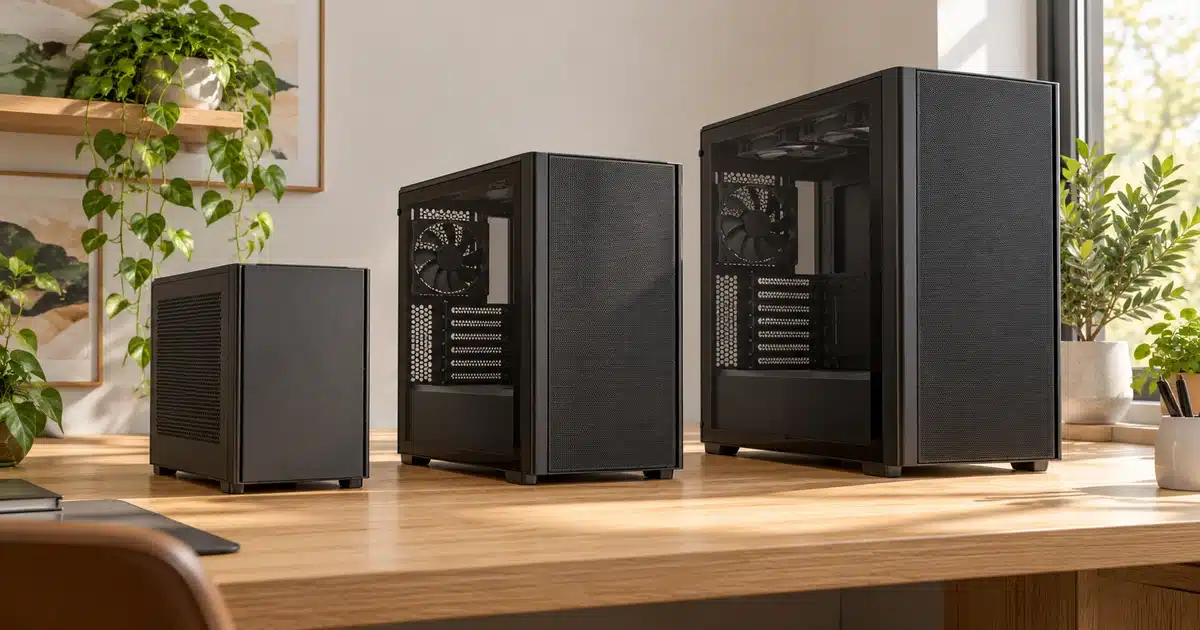
Same Budget, Different Strengths: 3 Cases Under $100
To show how much cases vary even at the same price, here are three popular mid-towers. All specs are from manufacturer spec sheets or retailer listings, and none were tested by us.
| Spec | NZXT H5 Flow (2024) | Phanteks XT Pro Ultra | Lian Li Vector V100 |
|---|---|---|---|
| Price (Newegg, Oct 2026) | Under $90 | $79.99 | $74.99 ✓ |
| Fans Included | 2 x 120 mm | 4 x 140 mm ✓ | 4 x 120 mm ARGB |
| Max GPU Length | 410 mm | 415 mm | 420 mm ✓ |
| Max Air Cooler Height | 170 mm | 184 mm ✓ | 178 mm |
| Radiator Support | Up to 360 mm front, 240 mm top | Up to 360 mm top, 240 mm front | 360 mm (top) |
| Front Panel | Mesh | Mesh | Glass (side fans for intake) |
| Back-Connect Boards | Not listed | Yes (MSI Project Zero, ASUS BTF, Gigabyte Project Stealth) ✓ | Not listed |
| Check Price | See Price → | See Price → | See Price → |
Source tiers: Prices and fan counts are Third-Party Published, from Newegg (Oct 2026). XT Pro Ultra specs are Manufacturer Spec, from Phanteks. H5 Flow specs are NZXT’s published figures as listed by Best Buy and Computer Alliance. V100 specs are as listed by Memory Express. Prices change often.
The Phanteks gives you the most fans, the tallest cooler clearance, and back-connect support. The NZXT takes the largest front radiator. The Lian Li fits the longest GPU and trades a mesh front for a glass one. Same budget, different priorities.
Why Have PC Case Prices Gone Up?
If prices look higher than you remember, tariffs are part of the reason. In 2025, PCWorld reported that U.S. tariffs on Chinese products raised case prices by roughly $10 to $25 per case (PCWorld). Watching for sales still pays off.
Price is only part of the picture, though. The right case also depends on who you are and how you’ll use your PC.
Which PC Case Is Right for You?
The best case depends on how you’ll use your PC and where it will live. Find the profile below that sounds most like you.
Best Fit: ATX Mid-Tower
Go with: an ATX mid-tower with a mesh front and at least two fans included. The extra room makes cable routing and part installation much easier. Skip: Mini-ITX cases. They’re rewarding, but tight clearances punish small planning mistakes.
Best Fit: Airflow Mid or Full Tower
Go with: an airflow-focused mid-tower or full tower with plenty of GPU clearance and a 360 mm radiator mount. Check the GPU length that applies with your front fans installed. Skip: glass-front or silent cases if you run a hot, power-hungry graphics card.
Good Fit: Micro-ATX or Mini-ITX
Go with: a Micro-ATX case for a balance of size and flexibility, or Mini-ITX if space is truly tight. Skip: full towers. Measure your desk or TV stand before you buy anything.
Good Fit: Silent Case
Go with: a case with solid panels and sound-dampening foam. With modest hardware, you don’t need maximum airflow. Skip: RGB showcase cases with lots of glass. You’re paying for looks you may not want.
Best Fit: Large Mid or Full Tower
Go with: a large mid-tower or full tower with extra drive mounts, strong airflow, and room for E-ATX if your board needs it. Skip: compact cases. Long renders and large storage arrays need space and steady cooling.
Common PC Case Mistakes to Avoid
Even careful builders slip up on the same handful of things. Here are the most common mistakes, each with a quick fix.
- Picking a case for looks first. Fix: confirm fit and airflow before you fall for the glass and RGB.
- Trusting the headline GPU length. Fix: use the clearance number that matches your front fan or radiator setup, since it can be much shorter.
- Assuming any radiator fits anywhere. Fix: check the supported size at the exact mount you’ll use, plus the radiator-and-fan thickness limit.
- Forgetting the power supply. Fix: check the maximum PSU length, and whether a small case requires an SFX unit.
- Trusting “E-ATX support” blindly. Fix: compare your board’s actual width to the case’s listed E-ATX limit.
- Buying a back-connect motherboard for a standard case. Fix: make sure the case explicitly lists back-connect support.
- Paying for a front USB-C port your board can’t use. Fix: confirm your motherboard has an internal USB-C front panel header.
- Not measuring your space. Fix: check the case’s outside dimensions against your desk or cabinet, and leave room for airflow and cables behind it.
With the pitfalls covered, here are the cases that stand out in 2026 based on published specs and reviews.
Our Research-Based PC Case Picks for 2026
If you’d rather start with a shortlist, these four cases stand out based on published specs and reviews from other outlets. To be clear, we haven’t tested these cases ourselves. Each pick names its source so you can read the original review.
Best Overall Mid-Tower: Fractal Design Meshify 2
Newegg’s 2026 guide calls the Meshify 2 one of the best all-around mid-towers, citing its mesh front, roomy interior, and strong cable routing. It supports up to a 360 mm front radiator and a 280 mm top radiator, and Newegg lists it at around $110 to $130 (Third-Party Published: Newegg) — Research-Based Pick
Newer option: Fractal released the Meshify 3 in May 2025, with an original MSRP of $140 to $220 depending on the version (Third-Party Published: Gamers Nexus). It ships with three 140 mm fans, supports a 360 mm front and 280 mm top radiator, and fits GPUs up to 349 mm (Third-Party Published: KitGuru). If the Meshify 2 is out of stock or priced close to it, compare the two.
Best for: performance-focused builds that want great airflow without premium pricing.
Best Budget: Phanteks XT Pro Ultra
Tom’s Hardware names it the best budget back-connect ATX case, noting that for about $80 it delivers great airflow, lots of RGB, and support for high-end hardware (Third-Party Published: Tom’s Hardware). It also ships with four 140 mm D-RGB fans and carries a 5-year limited warranty (Manufacturer Spec: Phanteks) — Research-Based Pick
Best for: first-time builders and anyone eyeing a back-connect motherboard.
Best Mini-ITX: Fractal Design Terra
Newegg recommends the Terra as a premium Mini-ITX choice. It fits graphics cards up to 322 mm and 240 mm radiators in an aluminum shell that looks more like a home appliance than a gaming case (Third-Party Published: Newegg) — Research-Based Pick
Best for: small desks and living rooms. Plan your parts carefully, since small cases leave little margin.
Best for Quiet Builds: be quiet! Silent Base 802
Its standout feature is swappable top and front panels, so you can choose between sound-dampened solid panels or more airflow. It also supports radiators up to 420 mm (Third-Party Published: Evetech review) — Research-Based Pick
Honest note: we couldn’t find a fresh 2026 test of this case from a major U.S. publication, so check recent user reviews before buying.
Best for: home offices, streamers, and anyone sharing a room with their PC.
The Bottom Line: How to Choose the Right PC Case
Key Takeaways
- Start with your motherboard size, because it sets the minimum case size.
- Check GPU length with your fan or radiator setup, CPU cooler height, and power supply length before anything else.
- Confirm radiator support at the exact mounting spot you plan to use.
- Look for a mesh front and at least two included fans if you game.
- Choose looks and RGB only after everything fits.
Which PC Case Should You Buy?
The right PC case is the one that fits your parts, your desk, and your cooling plan. For most people, the safest choice is an ATX mid-tower with a mesh front panel and at least two fans included, priced around $80 to $130. It fits the widest range of hardware, cools well, and leaves room to upgrade.
Go smaller only if desk space truly matters. Go bigger only if you’re running an E-ATX board, multiple radiators, or lots of storage. Before you buy, write down your GPU length, cooler height, and PSU length, and check all three against the case’s spec sheet.
Frequently Asked Questions
What size PC case do I need?
Can I put any motherboard in any PC case?
Can a Micro-ATX motherboard fit in an ATX case?
How much should I spend on a PC case?
How many fans does a PC case need?
Does a bigger PC case mean better cooling?
Is a mid-tower big enough for a high-end graphics card?
Do I need a tempered glass side panel?
Does the PC case affect gaming performance?
Key sources for this guide, listed latest-first. Other sources are linked in context throughout the article.
Newegg Insider
How to Choose the Right PC Case for Your Build (2026)
NZXT
What Size PC Case Do I Need?
MSI
How to Choose a PC Case for Your Build: Steps & Checklist
Tom’s Hardware
Best PC Cases 2026: Our Tested Picks for Your Next Build
Gamers Nexus
Fractal Design Meshify 3 Case Review
PCWorld
Which PC Case Should You Buy? This Guide Will Help
Phanteks
XT Pro Ultra | Black

Shamim Sarker is the Founder and Lead Tech Reviewer at ShamimTechReview.com. With over 8 years of hands-on experience in consumer electronics, he specializes in unbiased reviews of smartphones, laptops, cameras, AI tools, and smart gadgets.
Shamim personally tests every product through rigorous real-world usage and data-driven benchmarks, maintaining complete transparency with no paid promotions. His mission is to help readers cut through marketing hype and make confident, informed buying decisions.