
Disclosure: This post contains affiliate links. We may earn a commission at no extra cost to you. Our recommendations are based on manufacturer specifications and trusted published research, not our own lab tests.
Comparison

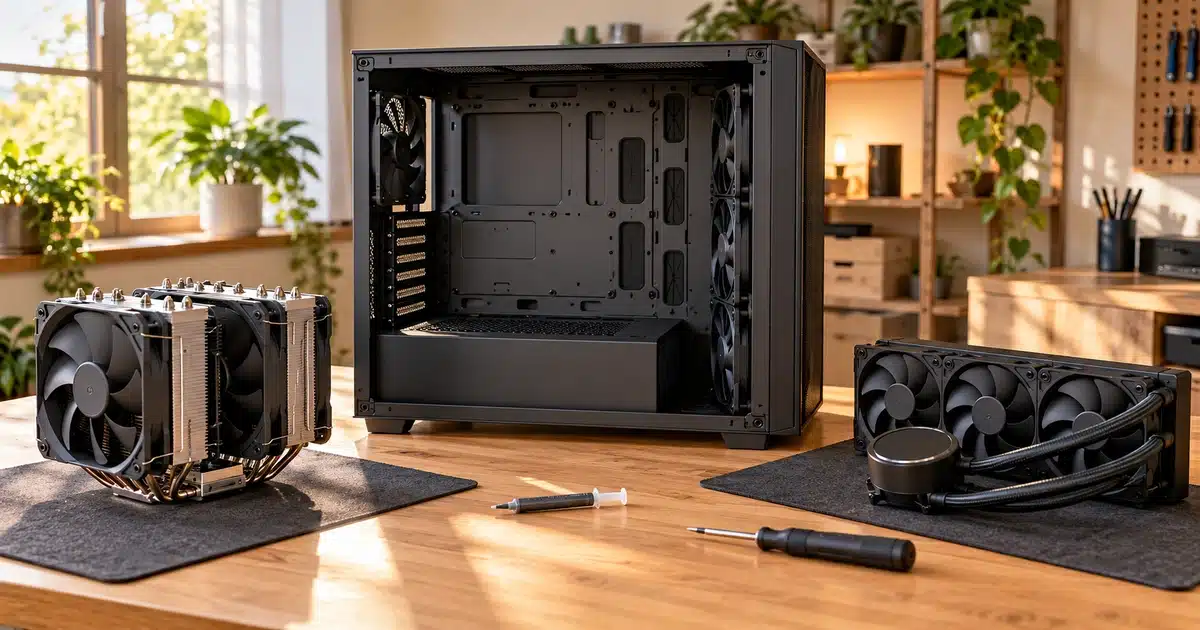
For most gaming PCs, a good dual-tower air cooler is the better buy. Published testing puts a $35 model within 2 to 4°C of a 240mm AIO, and it costs less with no pump to fail. Pick an AIO for 200W+ CPUs, long renders, compact cases, or a cleaner look.
- At a 200W load, MaxMyBuild measured the ~$35 Thermalright Peerless Assassin 120 SE at 54.4°C above room temperature, compared with 52.3°C for the ~$160 Noctua NH-D15 G2.
- MaxMyBuild estimates a 240mm AIO at about 50 to 52°C on the same load. That’s roughly 2 to 4°C cooler than budget air, and it’s an estimate rather than a same-rig result.
- Air cooling covers CPUs up to about 200W, including the Ryzen 7 7800X3D and the 120W-TDP Ryzen 7 9800X3D. A 360mm AIO pays off on 200W+ sustained loads like the Core i9-14900K or Ryzen 9 9950X.
- An air cooler’s only wear part is its fan. When an AIO pump fails, you usually replace the whole cooler, though Arctic and NZXT back their AIOs with 6-year warranties.
- Noctua hand-measured more than 100 PC cases and found inaccurate cooler-clearance specs on 56 of them, so check fit before you buy either type.
Air Cooler
From ~$29 · No pump · Fan is the only wear part
AIO Liquid Cooler
From ~$65 · Best for 200W+ sustained loads
Choose an AIO if your CPU runs 200W+ for long stretches, you stream or edit video, your case can’t fit a tall tower, or you want a clean, open look.
You’ve picked your CPU and graphics card. Now the cooler aisle offers you a $35 metal tower with two fans, or a $180 kit with a pump, a radiator, and a light show. Forum threads won’t settle it, because most people arguing are defending what they already bought.
Gaming PC cooling isn’t about buying the most expensive option. It’s about matching the cooler to the heat your CPU actually produces, the space inside your case, and how much fan noise you’ll tolerate.
This guide explains how air coolers and AIO liquid coolers work and what published testing shows about temperatures and noise. It also covers what each type really costs over its lifetime. At the end, a simple decision chart helps you pick the right one in about five minutes.
We didn’t run our own lab tests for this article. Instead, we compiled published testing from Tom’s Hardware and MaxMyBuild, guides from cooler makers NZXT and Corsair, manufacturer spec sheets, and Noctua’s 2026 case-clearance measurements. NZXT and Corsair sell CPU coolers, so we treat their guides as useful context, not neutral testing. Every performance number is labeled with its source so you can check it yourself. Prices are approximate and were checked on the date shown above.
What Is Gaming PC Cooling?
Before comparing the two cooler types, it helps to know what they’re up against.
Gaming PC cooling is the set of parts that moves heat away from your processor and graphics card and out of the case. Nearly all the electricity your chips use turns into heat, and that heat has to go somewhere.
Where Does the Heat in a Gaming PC Come From?
Two parts do most of the heating. The CPU (processor) and the GPU (graphics card) handle the heavy lifting in games, so they draw the most power.
Smaller sources add some extra warmth, such as the motherboard’s power circuitry (called VRMs) and fast NVMe SSDs.
Your graphics card comes with its own cooler already attached. A CPU usually doesn’t, or it ships with a basic one. That’s why the CPU cooler is the part you’ll pick separately.
What Happens When Your CPU Gets Too Hot?
Running warm isn’t automatically a problem, though. According to NZXT’s cooling guide, modern processors are designed to run at 80 to 90°C during intensive work, and either cooler type keeps a correctly matched build inside that range. (Source tier: Manufacturer-published guide)
The real goal is staying below the throttle point, not chasing the lowest possible temperature.
What Are the Four Parts of a Cooling System?
Of these four parts, the CPU cooler has the biggest effect on temperatures, noise, and cost. Let’s start with the simpler option: the air cooler.
How an Air Cooler Works
An air cooler is the simpler of the two designs, which is a big part of its appeal.
How Do Heat Pipes, Fins, and Fans Work Together?
According to NZXT’s breakdown, an air cooler has four parts: a mounting system, heat pipes, a heatsink, and one or more fans.
The copper heat pipes sit against the top of your CPU. Inside each pipe, a small amount of liquid turns to vapor as it absorbs heat, carries that heat up into the fins, then condenses and flows back down.
The fins spread the heat across a large metal surface. The fan then blows air across them and carries the heat into your case, where your case fans push it out.
There’s no pump and no coolant loop, so the fan is the only moving part. If it ever fails, you can swap it for a standard 120mm or 140mm fan.
Single-Tower or Dual-Tower: What’s the Difference?
Single-tower coolers use one fin stack with one or two fans. They’re shorter and lighter, and they usually leave more room around your RAM. That makes them a good match for midrange CPUs and smaller cases.
Dual-tower coolers use two fin stacks with a fan between or beside them. The extra metal handles more heat, which is why budget dual-towers like the Thermalright Peerless Assassin 120 SE became so popular. The tradeoff is size: they’re taller, heavier, and can overhang tall RAM sticks.
An AIO liquid cooler takes a different approach. It moves the heat away from the CPU before getting rid of it.
How an AIO Liquid Cooler Works
An AIO uses the same basic idea as an air cooler. It just adds a longer path between your CPU and the air.
How Do the Cold Plate, Pump, Tubing, and Radiator Work?
Per NZXT’s guide, an AIO uses a coolant (typically a glycol and water mix), a cold plate, a pump, tubing, a radiator, and fans. Here’s the order the heat travels in:
- The cold plate sits on your CPU and passes heat into the coolant.
- The pump pushes the warm coolant through the tubing.
- The radiator, mounted on the edge of your case, spreads that heat across thin fins.
- The fans blow air through the radiator, and the cooled liquid returns to the CPU.
Where Does the Heat End Up?
This is the biggest practical difference between the two designs. An air cooler releases CPU heat in the middle of your case, and your case fans have to clear it out.
An AIO with its radiator mounted as an exhaust pushes that heat straight out of the case. That can help other parts, like your graphics card and SSD, run a little cooler.
There’s one tradeoff. A tower cooler’s fan also pushes some air across the VRMs and memory around the CPU socket, and an AIO loses that airflow. Arctic’s Liquid Freezer III addresses this with a small VRM fan built into the pump block, according to KitGuru. (Third-Party Published)
How heat leaves your CPU with an air cooler vs. an AIO liquid cooler. Diagram is conceptual, not to scale.
What Do AIO Radiator Sizes Mean?
AIOs are named by radiator length, which matches the fans they hold. A 240mm radiator fits two 120mm fans, and a 360mm radiator fits three.
Bigger radiators shed more heat. As Micro Center explains, larger radiators also let the fans spin slower, so the cooler runs quieter. (Retailer guide) Returns diminish once the radiator is big enough for your CPU, though.
| Radiator Size | Fans | Typically Suits | What to Know |
|---|---|---|---|
| 120mm | 1 × 120mm | Very small cases | Usually no better than a good air cooler |
| 240mm | 2 × 120mm | Mainstream CPUs, compact builds | Fits most mid-tower cases |
| 280mm | 2 × 140mm | Mid-towers with 140mm fan mounts | Larger fans can spin slower than a 240’s |
| 360mm | 3 × 120mm | Most gaming and creator builds | Best balance of cooling and noise |
| 420mm | 3 × 140mm | High-core-count CPUs, long heavy loads | Needs a case built for it |
Sources: NZXT (radiator use cases; Manufacturer-published guide) and Tom’s Hardware, which notes that AIOs, especially single-fan models, won’t necessarily beat a good modern air cooler (Third-Party Published).
Is an AIO the Same as a Custom Loop?
No. A custom loop is the build-it-yourself version of liquid cooling. You choose a separate pump, reservoir, radiators, and fittings, then fill and maintain the loop yourself. It can cool both the CPU and the GPU, but it costs far more and needs regular coolant changes.
An AIO gives you liquid cooling without that work, which is why this guide compares air coolers against AIOs. Now that you know how each type works, here’s how they compare side by side.
Air Cooler vs AIO at a Glance
Here’s the quick version before we get into the details. The table below compares an air cooler vs. an AIO on the ten factors that matter most when you’re buying one.
Neither type wins every row. Air takes the edge on price, simplicity, and lifespan. An AIO wins on sustained heavy loads, space around the CPU, and looks.
| Factor | Air Cooler | AIO Liquid Cooler | Edge |
|---|---|---|---|
| Cooling in games | Within a few degrees of a similar-class AIO | Slightly cooler | Near tie |
| Long, heavy workloads | Can approach its limit on hot CPUs | Holds lower temps for longer ✓ | AIO |
| Noise | Fan noise only | Fan noise plus a pump | Depends on model |
| Typical price | About $25 to $160 ✓ | About $65 to $280 | Air |
| Installation | Fewer parts and cables ✓ | Radiator, fans, and pump to mount | Air |
| Moving parts | Fan only ✓ | Fans and a sealed pump | Air |
| What wears out | Fan (cheap to replace) ✓ | Pump (usually means replacing the whole cooler) | Air |
| Leak risk | None ✓ | Rare, but possible | Air |
| Case fit | Limited by cooler height and RAM | Limited by radiator mounts | Depends on case |
| Looks | Bulky tower over the motherboard | Clean socket area, often RGB or a screen ✓ | AIO |
Sources: price ranges from MaxMyBuild and Tech-Insider (Third-Party Published); performance, failure points, and heat behavior from NZXT (Manufacturer-published guide).
The two cooling rows at the top of that table hide the most nuance, so let’s look at what actually decides which type runs cooler.
Which Cools Better? Real Performance Explained
On paper, liquid always wins. In a real gaming PC, the answer depends mostly on one number: how much power your CPU actually draws.
Why Does Your CPU’s Power Draw Decide the Winner?
Every watt your CPU uses becomes heat your cooler has to remove. That’s why CPU wattage matters more than the air vs. AIO label.
MaxMyBuild’s June 2026 cooler guide breaks it down by wattage (Third-Party Published):
- Under 125W (Ryzen 5, Core i5, Ryzen 7 7800X3D): any single- or dual-tower air cooler. An AIO is overkill.
- 125W to 200W (Ryzen 7, Core i7, Ryzen 9 9900X): a dual-tower air cooler. A 360mm AIO is only marginally cooler.
- 200W+ sustained (Core i9-14900K, Ryzen 9 9950X, overclocked chips): this is where an AIO, especially a 360mm, starts earning its price.
Newer chips fit the same bands by their rated power. AMD rates the Ryzen 7 9800X3D at 120W TDP, and Intel lists a 250W maximum turbo power for the Core Ultra 9 285K. (Manufacturer Spec) Still deciding on a processor? See our desktop CPU buying guide.
Keep in mind that games rarely push a CPU to its maximum. A chip rated for 200W+ often draws far less while gaming, so size your cooler for the work you actually do.
Do Short Bursts and Long Loads Change the Result?
Yes. An AIO’s coolant and radiator hold more heat before temperatures climb. NZXT points out that during short bursts, a good air cooler and a similar-class AIO land closer together than most people assume. The gap opens during long, sustained loads like rendering or compiling.
Gaming mostly creates short, uneven spikes. Hour-long video exports create the steady heat where liquid pulls ahead.
What Do Published Benchmarks Show?
At a 200W load, MaxMyBuild measured the $35 Peerless Assassin 120 SE at 54.4°C, the $40 ID-Cooling Frozn A620 at 52.9°C, and the $160 Noctua NH-D15 G2 at 52.3°C. (Third-Party Published)
The same guide estimates a 240mm AIO at about 50 to 52°C. That AIO figure is an approximate range, not a result from the same test rig, because MaxMyBuild says its benchmark database covers air coolers only.
gap between a $35 and a $160 air cooler at 200W (MaxMyBuild); an estimated 2 to 4°C separates budget air from a 240mm AIO
At a 200W load, published figures put budget air, premium air, and an estimated 240mm AIO within about 4°C of each other. The AIO bar is dashed because it’s an approximate range, not a measured result. Bars start at zero to show the real size of the gap.
Will a Few Degrees Change Your Frame Rate?
Usually not. MaxMyBuild concludes that a 2 to 4°C difference doesn’t change gaming performance, because both results sit well below the point where a CPU starts throttling.
Cooler temperatures only translate into more speed when your current cooler lets the CPU hit its limit.
If your CPU already runs hot, try a free fix before buying new hardware. Lowering power limits, such as AMD’s Eco Mode or Intel’s power-limit settings in the BIOS, cuts heat at the source. Because games rarely use a CPU’s full power budget, the frame-rate cost is often small. Check your motherboard manual for the exact setting.
Temperature isn’t the only thing that changes when you pick a cooler, though. Next up is how loud each one gets.
Noise: Which One Is Quieter?
For many builders, especially anyone gaming in a bedroom or shared space, noise matters as much as temperature. Here, the answer is closer than most marketing suggests.
Does Fan Noise Depend on Cooler Type?
Not really. Most of the sound from either cooler comes from its fans. Big fans spinning slowly are quiet. Small fans spinning fast are loud.
NZXT puts it plainly: noise depends more on the specific model than on the category. A large radiator with slow fans is very quiet, and so is a large air cooler with slow fans. (Manufacturer-published guide)
That’s why a 360mm AIO can run quieter than a budget air cooler under heavy load. Its three fans share the work and can spin slower.
On the air side, MaxMyBuild’s max-fan-speed figures show how much models differ. (Third-Party Published)
| be quiet! Dark Rock Pro 4 | 37.5 dBA (quietest in MaxMyBuild’s 2026 database; since followed by the Dark Rock Pro 5) |
|---|---|
| Arctic Freezer 36 | 39.3 dBA |
| Thermalright Peerless Assassin 120 SE | 42.3 dBA |
| Noctua NH-D15 G2 | 43.8 dBA |
| ID-Cooling Frozn A620 | 47.5 dBA |
What Is AIO Pump Noise?
An AIO adds a sound source that an air cooler doesn’t have: the pump. NZXT notes that normal pump sounds include a faint trickle of coolant and a slight motor whine.
Gurgling or rattling is different. It usually means air is trapped in the pump, and it’s often fixable. NZXT’s guide to AIO pump noise explains how to tell the sounds apart.
If you want the fewest possible noise sources, a large air cooler wins. If you want the lowest noise under long, heavy loads, a big AIO with slow fans is hard to beat.
Price usually decides the purchase, though, so here’s what each option actually costs.
Price: What You’ll Actually Pay in 2026
Cooling performance is close, but prices aren’t. Here’s where your money actually goes in each tier.
A strong dual-tower air cooler starts around $35, and capable single-towers cost even less. AIOs start higher, and the most expensive ones charge mostly for screens, RGB, and software rather than extra cooling.
| Tier | Air Cooler Pick | AIO Pick | Price Gap |
|---|---|---|---|
| Budget | Thermalright Peerless Assassin 120 SE ~$35 ✓ Check Price on Amazon → Compare on Newegg → |
Thermalright Frozen Warframe 360 ~$85 Check Price on Amazon → |
~$50 |
| Midrange | ID-Cooling Frozn A620 ~$40 ✓ Check Price on Amazon → |
Arctic Liquid Freezer III 240 ~$65 to $75 Check Price on Amazon → Compare on Newegg → |
~$25 to $35 |
| Premium (value) | Noctua NH-D15 G2 ~$150 to $160 Check Price on Amazon → Compare on Newegg → |
Arctic Liquid Freezer III 360 ~$105 to $110 ✓ Check Price on Amazon → Compare on Newegg → |
AIO is ~$45 cheaper |
| Premium (display) | Noctua NH-D15 G2 ~$150 to $160 ✓ |
NZXT Kraken Elite 360 ~$280 Check Price on Amazon → See It on NZXT.com → |
~$120 to $130 |
Prices are approximate and change often. Sources: MaxMyBuild (June 2026) and Tech-Insider (updated October 2026). Check the current price before you buy.
What Does the Price Gap Really Buy You?
In the midrange, air and liquid cost about the same. At that point, your case and your looks preference should decide, not the price tag.
At the top end, the order flips. The Arctic Liquid Freezer III 360 costs less than Noctua’s flagship air cooler. Arctic also sells a newer Liquid Freezer III Pro 360 with faster fans, which MaxMyBuild prices at roughly $110 to $120. The roughly $280 Kraken Elite costs more mainly because of its LCD screen and software, not because it cools much better.
On a gaming-only build, the cheapest smart move is still a ~$35 dual-tower air cooler. MaxMyBuild’s verdict is the same: put the savings toward your graphics card, where they’ll actually raise your frame rate. Our graphics card buying guide shows where that money goes furthest.
Sticker price is only part of the cost, though. How long each cooler lasts changes the math.
Reliability, Lifespan, and Leak Risk
Price tells you what you’ll pay today. Reliability tells you whether you’ll be buying another cooler in a few years.
What Can Fail on Each Type?
An air cooler has one part that wears out: the fan. The metal heatsink has nothing to break. If a fan dies, you replace it with a standard 120mm or 140mm fan and keep going.
An AIO adds a pump, tubing, and coolant. According to Tom’s Hardware, pumps typically last several years, but when one fails, you usually have to replace the entire cooler. (Third-Party Published)
Leaks are the fear most people have. Tom’s Hardware calls them rare but possible, usually after damage or a part failing over time. NZXT adds that AIOs are factory-sealed and should never be opened or refilled.
How Do Warranties and Long-Term Costs Compare?
Warranty length is the clearest signal of how long a manufacturer expects its cooler to last. Here’s how the coolers from our price table compare.
| Cooler | Type | Warranty | Main Wear Part | If It Fails |
|---|---|---|---|---|
| Noctua NH-D15 G2 | Air | 6 years | Fans (rated 150,000+ hours MTTF) | Swap a fan |
| Thermalright Peerless Assassin 120 SE | Air | 2 to 3 years (varies by seller) | Fans | Swap a fan |
| Arctic Liquid Freezer III | AIO | 6 years | Pump | Warranty claim or new cooler |
| NZXT Kraken Elite 360 | AIO | 6 years | Pump | Warranty claim or new cooler |
Tier: Manufacturer Spec. Warranty terms from Noctua’s NH-D15 G2 info sheet, Arctic’s 6-year Liquid Freezer III warranty, and NZXT’s 6-year Kraken Elite warranty as listed by retailers such as Adorama. Thermalright’s coverage varies by seller, so confirm it before you buy.
The long-term math favors air. A good air cooler can move from one build to the next for years, as long as it supports your new CPU socket. An AIO’s pump has a limited life, so plan on a replacement eventually if you keep your PC well past the warranty.
How Should You Mount an AIO So the Pump Lasts Longer?
NZXT says correct radiator mounting, so air can’t collect in the pump, is the single biggest thing you can do to extend an AIO’s life.
Air bubbles rise to the highest point in the loop. Keep the pump lower than the top of the radiator so trapped air settles in the radiator instead. A top-mounted radiator does this naturally. NZXT’s radiator mounting guide walks through the other layouts.
Mounting brings up the next practical question: will the cooler you want actually fit inside your case?
Size, Clearance, and Case Fit
A cooler that doesn’t fit can’t cool anything. This is where many first-time builders get caught, so check fit before you compare temperatures.
How Tall Is Too Tall for an Air Cooler?
Every case lists a maximum CPU cooler height. MaxMyBuild notes that most mid-towers support 160 to 165mm, and many go up to 170mm. (Third-Party Published)
Popular air coolers land right around that limit, and the NH-D15 G2 won’t fit in many compact and mATX cases.
| ID-Cooling Frozn A620 (height) | ~154mm |
|---|---|
| Thermalright Peerless Assassin 120 SE (height) | ~155mm |
| Noctua NH-D15 G2 (height) | ~168mm |
| Arctic Liquid Freezer III 360 (radiator) | ~398mm long × 38mm thick, before fans (Manufacturer Spec) |
| Typical mid-tower cooler limit | 160 to 165mm, many up to 170mm |
RAM is the other trap. Big dual-tower coolers hang over the memory slots closest to the CPU, so tall RAM heat spreaders can block the front fan. MaxMyBuild flags the NH-D15 G2 for this, while the Peerless Assassin family leaves more room.
Does Your Case Support the Radiator?
AIOs avoid the height problem but bring their own. Your case must have mounting points for the radiator size you buy.
Check whether your case supports a 360mm radiator on the top, the front, or both. A top mount also needs room above your RAM and motherboard heatsinks.
How Do You Check Clearance Before You Buy?
The errors go both ways. HotHardware notes that NZXT lists 75mm for its H2 Flow, but Noctua measured 79mm. TechSpot reports the Lian Li B4-mATX actually offers 164.5mm, not the advertised 168mm.
Find your case’s listed limits
Look up the maximum cooler height and supported radiator sizes on the manufacturer’s spec page.
Cross-check them
Look up your case in Noctua’s compatibility database or a hands-on case review. Leave a few millimeters of margin.
Check the neighbors
Compare your RAM height to the cooler’s RAM clearance, and make sure your motherboard’s M.2 heatsink won’t block an AIO’s pump block.
Will the Cooler Fit Your CPU Socket?
Confirm the cooler supports your CPU socket before you buy. According to MaxMyBuild, every cooler in its 2026 guide supports AMD’s AM4 and AM5 and Intel’s LGA1700 and LGA1851, and the Noctua NH-D15 G2 ships with a dedicated LGA1851 mount for Intel Core Ultra 200-series chips. (Third-Party Published)
On the AIO side, Arctic’s Liquid Freezer III coolers include a contact frame that improves pressure distribution on Intel CPUs, per KitGuru. (Third-Party Published) If you’re reusing an older cooler on a new platform, check that its maker offers a mounting kit for your socket.
Does Cooler Weight Matter?
Large dual-tower coolers are heavy. NZXT points out that a big air cooler puts significant weight on the CPU socket, which matters if you move or ship your PC. An AIO moves most of that weight to the case.
Once you know the cooler fits, the last practical questions are how hard it is to install, how much care it needs, and how it looks.
Installation, Maintenance, and Looks
With fit sorted, the remaining differences show up on build day and in the years after.
Which Is Easier to Install?
An air cooler is usually quicker. You mount a bracket, add thermal paste, set the cooler on the CPU, and plug one or two fans into the motherboard.
An AIO has more steps. Tom’s Hardware lists them: mount the radiator, attach two or three fans, fix the cold plate to the CPU, then connect cables for the pump, fans, and any RGB or data lines.
Still, the gap isn’t huge for most people. Corsair notes there’s no considerable difficulty gap between the two, though tight cases and low-profile air coolers can make either job fiddlier. (Manufacturer-published guide)
How Much Maintenance Does Each Need?
Both types need occasional dust cleaning. Fins on an air cooler and fins on an AIO radiator collect dust over time, and clogged fins cool worse. A quick blast of compressed air every few months keeps either one working well.
Always use fresh thermal paste any time you remove and remount a cooler. Old, dried paste is a common cause of surprisingly high temperatures after a rebuild.
Do Looks and RGB Matter?
Looks are a fair reason to choose. NZXT argues they’re a legitimate factor, not a frivolous one. An AIO clears the space over your motherboard and often adds a lit pump cap or even a small screen.
Air coolers have caught up somewhat. Plenty now come in all-black finishes or with RGB fans, and a few add small displays of their own. Corsair adds one tradeoff: a big air tower can hide premium RAM you paid extra to show off.
Pros and Cons of Each
Here’s everything above boiled down into one quick reference for each cooler type.
Air Cooler Pros and Cons
Pros
- Great performance from about $35, and capable options from about $29
- No pump, no coolant, no leak risk
- Only the fan wears out, and it’s cheap to swap
- Can move to your next build if the socket is supported
- Simple install with fewer cables
Cons
- Tall towers (154 to 168mm) don’t fit every case
- Big dual-towers can block tall RAM
- Heavy on the CPU socket if you move your PC
- Releases CPU heat inside the case
- Runs closer to its limit on 200W+ sustained loads
AIO Liquid Cooler Pros and Cons
Pros
- Holds lower temps during long, heavy workloads
- Can exhaust CPU heat straight out of the case
- Clears space around the CPU and RAM
- Large radiators can run very quietly under load
- Clean look, often with RGB or a screen
Cons
- Costs more at most tiers, especially with an LCD
- Pump has a limited life and isn’t serviceable
- Rare, but real, leak risk
- Adds pump noise an air cooler doesn’t have
- Needs radiator mounts your case may not have
Common Cooling Myths, Debunked
Forum advice often repeats rules that were true years ago. Here are four that don’t hold up in 2026.
Is Liquid Cooling Always Quieter?
Not always. NZXT says noise depends more on the specific model than the category. A big air cooler with slow fans can be just as quiet, and it has no pump.
Does Every Modern CPU Need an AIO?
Published data says otherwise. MaxMyBuild recommends air for CPUs up to about 200W, and Tom’s Hardware says a decent air cooler keeps Core i5 and Ryzen 5 chips at safe temperatures.
Does a Bigger Radiator Always Cool Better?
Only up to a point. Once a radiator is big enough for your CPU, NZXT says a larger one mostly buys quieter fans rather than lower temperatures. It also needs enough case airflow to work well.
Do AIOs Need Refilling Like a Car Radiator?
No. AIOs are sealed at the factory. NZXT warns that opening or topping one up voids the warranty and is more likely to cause a problem than fix one.
Which Should You Buy? A Simple Decision Guide
You don’t need to memorize every number above. Three questions decide it for almost everyone: how much power your CPU draws, whether a tower fits your case, and how much you care about looks.
Follow your CPU’s power draw down the chart to find the cooler type that fits. Gaming usually draws less than a CPU’s maximum rating.
Who Should Buy an Air Cooler, and Who Should Skip It?
Perfect Fit
A ~$35 dual-tower handles mainstream gaming CPUs and frees up money for your graphics card.
Perfect Fit
No pump means nothing to wear out except a cheap, swappable fan.
Good Fit
No coolant means zero leak risk over the life of the PC.
Not Ideal
Skip air if your case can’t fit a 155mm+ tower, or you run long 200W+ workloads every day.
Who Should Buy an AIO, and Who Should Skip It?
Perfect Fit
NZXT notes liquid makes more sense for streaming while gaming, video work, rendering, or compiling.
Perfect Fit
Sustained 200W+ is where a 360mm AIO earns its price.
Good Fit
You want an open view of your RAM and motherboard, or a pump screen.
Not Ideal
Skip an AIO if you only game on a mainstream CPU and want the best value, or your case lacks radiator mounts.
What Cooler Fits Common Builds?
| Build | Recommended Cooler | Why |
|---|---|---|
| 1440p gaming PC (Ryzen 7 X3D) | Air cooler | MaxMyBuild places the Ryzen 7 7800X3D in its under-125W, air-cooler tier, and AMD rates the newer 9800X3D at 120W TDP. Games rarely push these chips hard. |
| Streaming and video-editing rig | 280mm or 360mm AIO | Hours of steady load are exactly where liquid’s extra heat capacity pays off. |
| Small-form-factor build | Often an AIO | Tom’s Hardware notes AIOs are often the better choice when a tall tower won’t fit. |
| Quiet bedroom PC | Large air cooler, slow fans | It avoids pump hum entirely and stays quiet on gaming loads. |
Top Picks and Alternatives to Consider
These picks come straight from the price and testing data above. None were tested in-house; each is a research-based pick drawn from MaxMyBuild’s published results and manufacturer specs.
Thermalright Peerless Assassin 120 SE (~$35)
Best value for most gaming PCs: 54.4°C delta-T at 200W per MaxMyBuild, about 155mm tall. Research-Based Pick
Arctic Liquid Freezer III 360 (~$105 to $110)
Best AIO value for 200W+ sustained loads, with a VRM fan in the pump block and a 6-year warranty. Research-Based Pick
Arctic Freezer 36 (~$29)
Cheapest pick in MaxMyBuild’s database that still covers 200W, at 56.7°C delta-T and 39.3 dBA. Research-Based Pick
Noctua NH-D15 G2 (~$150 to $160)
Strongest air cooler in MaxMyBuild’s 2026 database, with a 6-year warranty. Check your case for its ~168mm height. Research-Based Pick
Key Takeaways
- Your CPU’s sustained power draw matters more than the air vs. AIO label.
- Under about 200W, a ~$35 dual-tower air cooler lands within an estimated 2 to 4°C of a 240mm AIO.
- An AIO earns its price on 200W+ sustained loads, in compact cases, or for a clean showcase look.
- Verify case clearance yourself; Noctua found inaccurate specs on 56 of 100+ cases.
- Mount an AIO’s pump below the top of the radiator to help it last longer.
Our Verdict: Air Cooler vs AIO
Bottom line: For most gaming PCs, an air cooler is the smarter buy. Match your cooler to your CPU’s power draw and your case, not the price tag, and put the money you save toward your graphics card.
Should You Buy an Air Cooler or an AIO?
MaxMyBuild’s June 2026 testing puts a ~$35 dual-tower like the Thermalright Peerless Assassin 120 SE within an estimated 2 to 4°C of a 240mm AIO at a 200W load, and that gap doesn’t change your frame rate. Air also means no pump to wear out and no leak risk, and the cooler can follow you to your next build if it supports the new socket.
An AIO earns its place in specific situations. Choose one if your CPU draws 200W or more for long stretches, you stream or edit video regularly, your case can’t fit a 155mm+ tower, or you want a clean showcase look. In those cases, the Arctic Liquid Freezer III 360 offers strong value at roughly $105 to $110, backed by a 6-year warranty. The newer Liquid Freezer III Pro 360 adds faster fans for about $10 to $15 more.
Peerless Assassin 120 SE (~$35) →
Liquid Freezer III 360 (~$105) →
Compare on Newegg →
Frequently Asked Questions
Do I need a liquid cooler for gaming?
Is an AIO better than an air cooler?
Do AIO coolers leak?
How long does an AIO cooler last?
Is a 240mm AIO better than a good air cooler?
Is a 360mm AIO worth it over a 240mm?
Is an AIO quieter than an air cooler?
Is liquid cooling worth it in 2026?
Can an air cooler handle a Ryzen 9 or Core Ultra 9?
References
MaxMyBuild
Best CPU Cooler in 2026: Air Coolers and AIOs Ranked
NZXT
Air Cooler vs AIO Liquid Cooler: Which Should You Buy?
Tom's Hardware (Kunal Khullar)
Liquid vs air cooling: Do you need an AIO cooler?
TechSpot
Noctua tested more than 100 PC cases and found over half had inaccurate CPU cooler clearance specs
Tech-Insider
Liquid Cooler vs Air Cooler 2026: Which CPU Cooling Wins
Noctua
NH-D15 G2 Information Sheet (PDF)
AMD
AMD Ryzen 7 9800X3D product specifications

Shamim Sarker is the Founder and Lead Tech Reviewer at ShamimTechReview.com. With over 8 years of hands-on experience in consumer electronics, he specializes in unbiased reviews of smartphones, laptops, cameras, AI tools, and smart gadgets.
Shamim personally tests every product through rigorous real-world usage and data-driven benchmarks, maintaining complete transparency with no paid promotions. His mission is to help readers cut through marketing hype and make confident, informed buying decisions.